
User manual.
Set up AllTails and get out for a walk.
Updated October 19, 2026 · Beta for iPhone and Apple Watch
Start with the beta Already installed? Record your first walk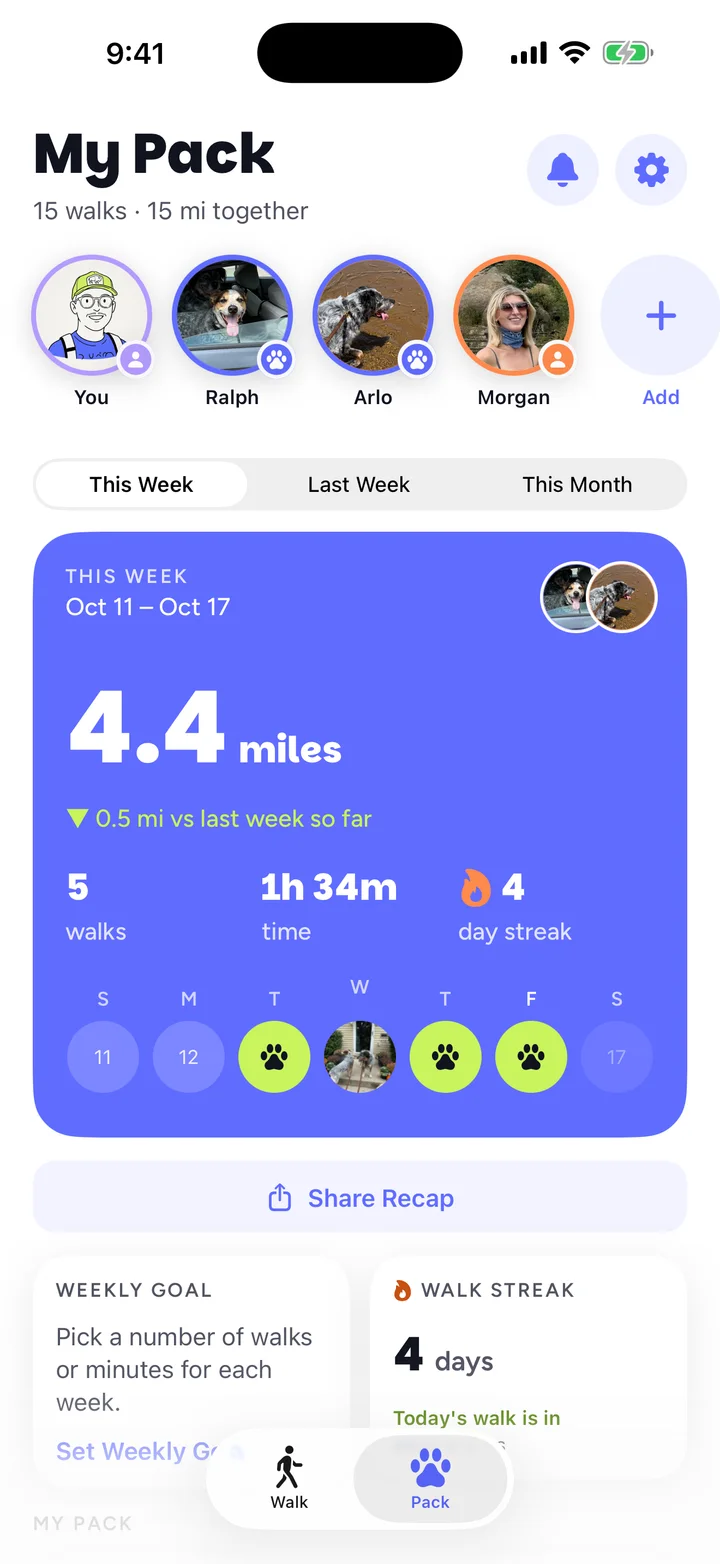
Join the free beta.
AllTails is available through TestFlight, Apple's app for trying beta apps. Start on your iPhone.
Install TestFlight.
Get TestFlight from the App Store. It's free.
Open the AllTails beta link.
Return here and join the AllTails beta. Tap View in TestFlight, then Accept and Install.
Open AllTails.
Tap Open in TestFlight, or tap the AllTails paw icon on your Home Screen.
You'll need iOS 17 or later. The optional Watch app needs watchOS 11 or later. Keep the beta current with Update in TestFlight.
Joining someone else's pack?
Install AllTails first, then open their invite link again. You can also tap Got an invite? during setup and paste the link. More about invites
Set up your dogs.
Open AllTails and tap Get Started. Choose whether you walk your own dogs or other people's dogs.
- Your own dogs: add your dog's name. You can add a photo and details such as breed, weight and age. Use Skip and enter later on optional steps.
- Other people's dogs: choose the dog walker option. Ask each owner to invite you to their pack. You do not need to create their dogs again.
Add your name so the pack can see who walked the dogs. Allow location when asked so AllTails can record your route. Health and notifications are optional.
To add another dog later, open Pack and use the add-dog control. Tap a dog's photo to edit its profile.
Record a walk.
Choose who's coming.
Open the Walk tab. Select the dogs coming with you and the person walking them.
Tap Start Walk.
Head outside. AllTails records the route, time and distance. Use Pause for a break, then Resume when you're moving again.
Finish and save.
Tap Finish when you're done. Review the walk summary. Your saved walk appears in Pack → History.
If AllTails asks about a very short walk, choose Save Anyway to keep it or Discard Walk to remove it. A failed save offers Retry Save; try that before starting another walk.
Find and edit walks.
Open Pack and scroll to History. Tap a walk to see its route, dogs, photos and stats. Use See All … Walks below the recent walks to search or sort your full history.
- Change the details
- Open a walk, then tap Edit → Edit Walk to change the dogs, walker, title or note.
- Add photos
- Use Edit → Add Photos in the walk details.
- Trim an extra stretch
- For a recorded route, choose Edit → Trim Walk. Drag the start and end handles, check the map, then tap Save.
- Delete a walk
- Choose Edit → Delete Walk and confirm. If a walk is shared with your pack, the deletion also reaches the pack.
Imported Health walks have an Apple Health label. They stay on the iPhone that imported them.
Share your pack.
A pack lets family, a partner or a dog walker log walks with the same dogs. Members can see the dogs' profiles and walks, including the route, time, walker name and note.
Invite someone
- Open Pack and tap Invite to Your Pack. If it's already shared, tap Your Pack Is Shared.
- Send the invite link in Messages, Mail or another app.
- Ask them to open the link on their iPhone. If they need the beta, they install it first, then return to the invite.
Accept an invite
Open the owner's link with AllTails installed. During setup, Got an invite? also accepts a pasted link or invite code. Follow the prompts and check that the owner's dogs appear in your pack.
Walk dogs for more than one family
Accept an invite from each owner. Tap the pack name at the top of Pack to switch. Each family sees the walks with its own dogs. Apple Health imports, heart rate and calories are not shared with packs.
Remove someone or leave
In your own pack, tap the person and choose Remove from Pack. In a pack you joined, switch to that pack and tap Leave Pack. Confirm the change in the app.
Apple Watch and Health.
Install the Watch app
Install AllTails on the paired iPhone first. In TestFlight, open AllTails and look in the app details for the Watch install option. Open AllTails on your iPhone to set up your dogs before using it on your Watch.
The Watch app can record a walk from your wrist. Select your dogs, start the walk, then finish when you're done. Open AllTails on the paired iPhone afterward to check the saved walk.
Connect Apple Health
In AllTails, open Pack → Settings → Apple Health. Choose the access you want to allow. Health can save walks as workouts and supply heart rate and calories. You can walk without connecting Health.
Import an earlier walk
- Open Pack → History → Import from Health.
- Allow access if asked. AllTails looks for walking workouts from the last 90 days.
- Select the walks you want, choose the dogs and walker, then tap the import button.
Imported Health walks stay on this iPhone. They do not go to your pack or cloud backup. If there are no new walks, check the date and that the workout is a walk.
Share a walk.
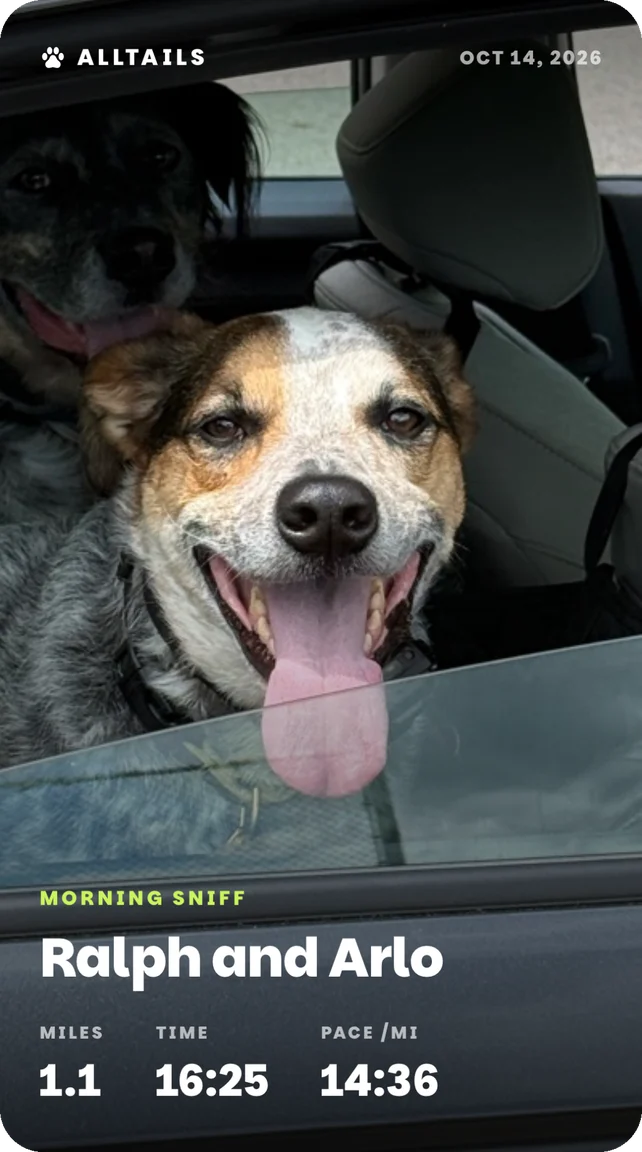
Open a saved walk and tap Share Walk. Swipe through the templates to choose an animated Replay or an image card. Use the card settings for available photos, colors and video quality.
Make it your dog's walk.
Choose a photo card to put your own photo on it. Tap Share to open the iPhone share sheet, where you can save it or send it to another app.
Route cards and replays hide about 150 metres at each end. Check the map and photos before sharing.
Keep your walks.
AllTails saves your walks on your phone and backs up eligible dogs, walks and photos to your account. Complete your account with Apple before changing phones or reinstalling.
- On your current iPhone, open Pack → Settings.
- Under Complete your account, tap Continue with Apple and finish signing in.
- On the new iPhone, open AllTails and choose I have an account. Sign in with the same Apple Account and let your data load.
Apple Health imports, heart rate and calories do not go into cloud backup. Keep the old phone until you've checked the dogs and walks on the new one.
Delete your account
In AllTails, open Pack → Settings → Manage Account → Delete Account. Read the confirmation before proceeding. This removes your account, cloud backup, uploaded photos and owned pack. Health workouts are managed separately in Apple Health.
Make it yours.
Goals and milestones
In Pack, tap Set Weekly Goal. Choose walks or minutes, set your target, then tap Save Goal. Tap an existing goal to change or remove it. Tap a milestone in the Milestones section to see your progress.
Settings
Open the gear in Pack to reach Settings.
- Distance
- Choose miles or kilometers.
- Notifications
- Allow pack updates and set a daily walk reminder. If notifications are blocked, use Open Settings to change the iPhone permission.
- App icon
- Choose another AllTails icon.
- Replay Onboarding
- Look through setup again.
Something still unclear?
Search the help center or email us. Tell us what you were trying to do and what happened.